WebPlus
A browser extension that adapts the web in real time, designed around what dyslexic users can do, not just what they find difficult.
Role
UX Researcher
timeline
Fall 2023 . UMBC
Before we designed anything — we made people feel it.
Early in our process, we ran an empathy exercise. No context. No warnings. Just: read this.
"Sdias Sulnyas cnturrley wokrs at Ueirvntisy of Warlyanb, Blatmoreo Cuoynct. Trehi wsot recnet pbculiitaon is 'Totuard Sptuporng Woidle Devcie Uesrs Facnig Sevreley Cntrnoinasg Sutaiitonanl Iipmarimetsn.'"
"Sdias Sulnyas cnturrley wokrs at Ueirvntisy of Warlyanb, Blatmoreo Cuoynct. Trehi wsot recnet pbculiitaon is 'Totuard Sptuporng Woidle Devcie Uesrs Facnig Sevreley Cntrnoinasg Sutaiitonanl Iipmarimetsn.'"
"Sidas Saulynas currently works at University of Maryland, Baltimore County. Their most recent publication is 'Towards Supporting Mobile Device Users Facing Severely Constraining Situational Impairments.'"
How did it make you feel?
😤 Frustrated
😵💫 Overhwhelmed
😕 Confused
😰 Stressed
🤔 Challenged
1 in 5
people in the US live with dyslexia
15 - 20%
of the global population is affected
60%
dyslexic people connect ideas and solve problems in ways others don't
The web wasn't built with dyslexic users in mind.
Most digital experiences assume a single, standard way of reading. For 15–20% of users, that assumption creates daily friction — not because of a lack of ability, but because of a lack of design consideration.
📖
Dense, unformatted text
Walls of text with tight line spacing and no visual breathing room make sustained reading exhausting for dyslexic users.
🔠
Poor font choices
Standard serif and sans-serif fonts weren't designed with letter disambiguation in mind — characters like b, d, p, and q are easily confused.
⏱️
Flat navigation structure
Shallow hierarchies don't leverage the strong spatial memory many dyslexic users possess — forcing a reading-heavy experience on a visually-strong mind.
🏞️
No visual context
Text-only layouts strip away the contextual cues — icons, images, landmarks — that help dyslexic readers anchor meaning and navigate confidently.
📐
Inconsistent layouts
Every website presents differently. Without consistent spatial structure, dyslexic users must re-orient themselves on every new page.
⚡️
No stress-aware adaptation
Every website presents differently. Without consistent spatial structure, dyslexic users must re-orient themselves on every new page.
Tools exist — but they all share the same blind spot.
Helperbird
OpenDyslexic
Read & Write
Dyslexic Browser
Dyslexie Font
Extensions like Helperbird, OpenDyslexic, and Read&Write offer font swaps, text-to-speech, and overlays. They're useful — but they're static. Every single one requires the user to manually configure settings upfront. None of them observe, adapt, or respond. They treat dyslexia as a fixed input to accommodate, not a dynamic experience to design for.
We didn't start with solutions. We started with the science.
Our research drew from peer-reviewed HCI literature, accessibility studies, and cognitive science — building a foundation before we touched a single design decision.
🧠
Cognitive & neurological research
Reviewed studies on how dyslexic brains process text differently — including phonological deficits and strengths in visual-spatial reasoning.
von Károlyi et al., 2003 · Hedenius et al., 2013.
📚
Literature review
Synthesized 29 peer-reviewed papers spanning dyslexia research, adaptive interfaces, and ability-based design across HCI and accessibility fields.
Morris et al., CHI 2018 · Heumader et al., ICCHP 2020
♿️
Accessibility standards audit
Benchmarked existing web accessibility guidelines to identify where WCAG 2.0 falls short for dyslexic users specifically.
W3C WCAG 2.0
🔍
Competitive analysis
Evaluated 10+ existing dyslexia tools across font, layout, and adaptive capabilities — documenting the gap between what exists and what's needed.
Helperbird, OpenDyslexic, Read&Write + others
💡
Ability-based design framework
Applied Wobbrock et al.'s ability-based design principles — designing around what users can do, not compensating for what they can't.
Wobbrock et al., 2011
📡
Adaptive UI research
Explored passive sensing methods — heart rate via smartwatch, eye tracking via webcam — as triggers for real-time interface adaptation.
Afergan et al., 2014 · Fairclough, 2009
"Dyslexic users don't need tools that correct them — they need environments that work with how they already think."
Two frameworks. One direction.
Before designing a single screen, we grounded WebPlus in two established frameworks from HCI research — ensuring our decisions were principled, not intuitive guesses.
Framework
Ability-Based Design
Proposed by Wobbrock et al. (2011), ability-based design shifts the focus from disability to capability. Instead of asking "what can't this user do?" — it asks "what can they do, and how do we design around that?" For dyslexic users, this meant designing around enhanced spatial memory, stronger holistic thinking, and better visual pattern recognition.
Leverage what users are good at rather than compensating for what they struggle with.
Dyslexic users remember where things are visually — deeper hierarchies and landmarks support this.
Icons and contextual images reduce cognitive load and help users navigate without reading.
Structure that supports scanning, chunking, and visual grouping reduces friction at every step.
Framework
Adaptive User Interfaces
Adaptive UIs respond to user state in real time — adjusting the interface based on detected signals rather than waiting for the user to manually change settings. WebPlus proposed using passive biometric sensing (heart rate via smartwatch, eye tracking via webcam) to detect cognitive stress and trigger layout adaptations automatically.
The user shouldn't have to do anything. Adaptation happens in the background, invisibly.
Elevated heart rate and prolonged fixation indicate reading difficulty — WebPlus uses these as triggers.
Changes are subtle and reversible — the interface eases into new states without jarring the user.
Automatic adaptations can always be overridden — the system assists, never overrides the user's agency.
Together, these two frameworks defined a clear direction
WebPlus adapts the web — so the user doesn't have to.
The extension sits passively in the browser. When stress signals are detected, it triggers one or more of four adaptation types — reshaping the page to work with the user, not against them.
📐
Page Layout Updates
Increases whitespace between paragraphs, tightens visual grouping, and applies proximity principles to make the page feel less overwhelming and easier to scan.
White Space
Proximity
Visual Grouping
🔠
Text Updates
Switches to OpenDyslexic font, increases kerning and letter spacing, adjusts line height, and removes full justification — all proven to reduce reading friction.
Line Spacing
Kerning
OpenDyslexic Font
🏞️
Icons & Visual Cues
Adds navigation header icons and contextual images alongside text — giving dyslexic users visual anchors to aid recognition and reduce the need to decode every word.
Nav Icons
Images
Visual anchors
⏱️
Hierarchy Adjustments
Restructures flat content into deeper, more spatially distinct hierarchies — leveraging the strong spatial memory many dyslexic users possess to make navigation feel natural.
Hierarchy
Structure
Spatial Memory
A working concept — built to show, not just describe.
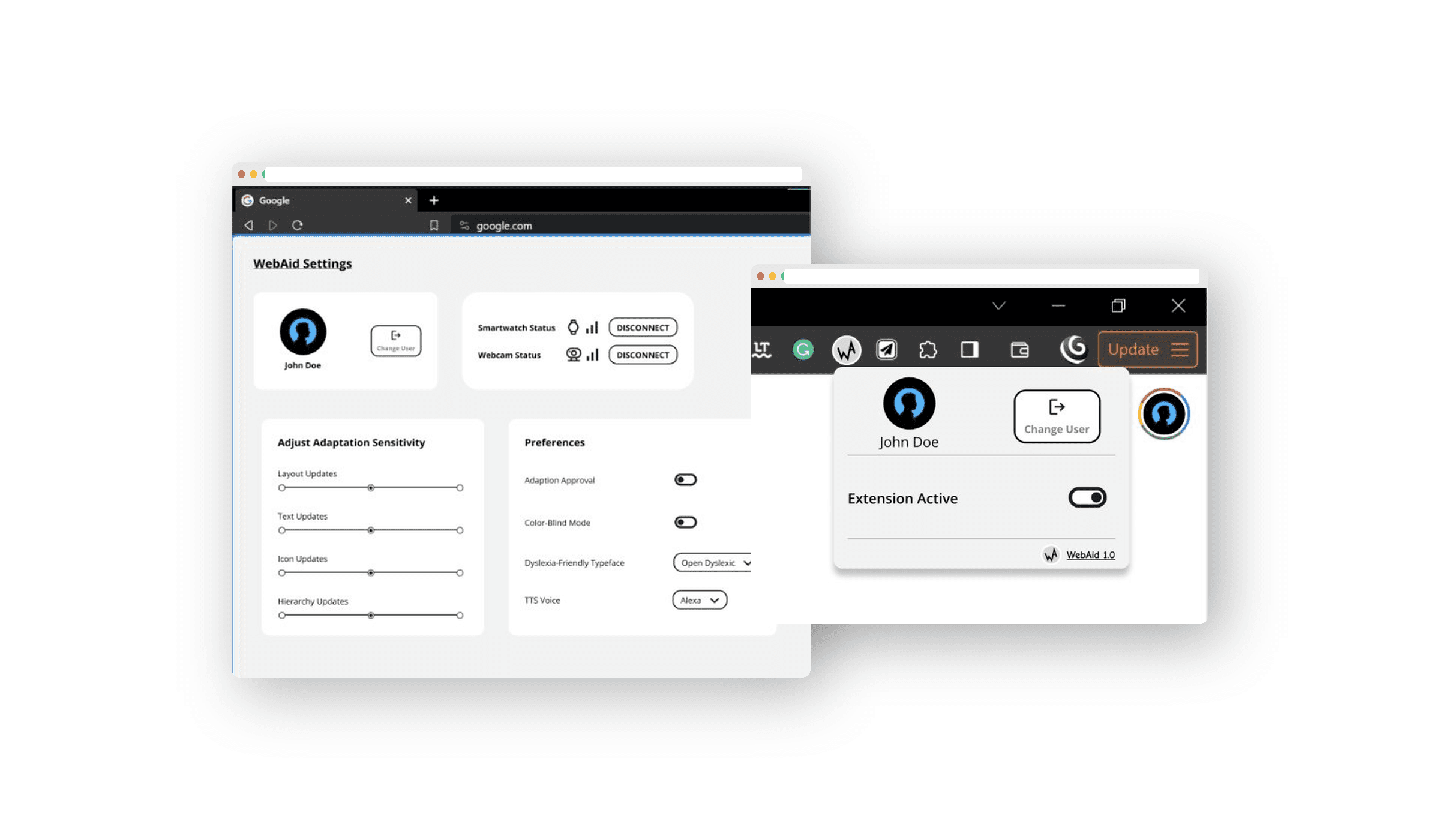
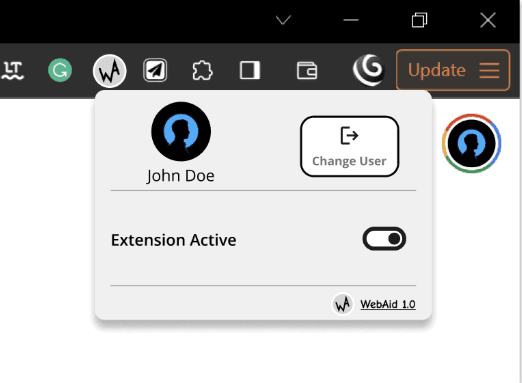
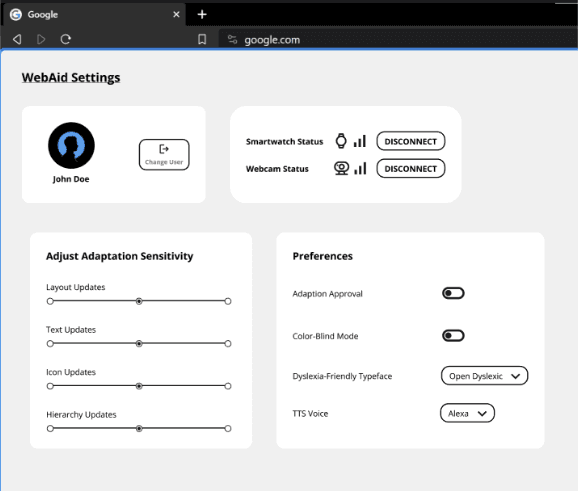
We built a functional prototype demonstrating the extension UI — the popup panel, settings controls, and adaptation feedback dialog.
What it does — and what comes next.
WebPlus is a research concept with a working prototype. We documented both its contributions and its boundaries — because good research is transparent.
A framework that puts dyslexic strengths at the center — not the periphery — of design
First concept to combine passive biometric sensing with real-time web adaptation for dyslexic users
Four adaptation types grounded in peer-reviewed cognitive and HCI research
Biometric pipeline is proposed, not built — stress detection needs full implementation
Smartwatch + webcam dependency limits who can use it — hardware accessibility is a real constraint
No user testing conducted — the concept hasn't been validated with dyslexic users yet
The next step is clear: build the sensing pipeline, run real sessions with dyslexic users, and let the data shape what WebPlus becomes.
That's a wrap on Clara
Liked what you saw?
Whether you want the full story... or Just want to say Hello
I'd Love to hear from you
 Download the paper